How SPN Compares to VPNs
SPN routes each connection independently through separate exit nodes using layered encryption, providing a different IP address per connection. VPNs route all traffic through a single server. This post compares how the two architectures differ.
| SPN | Most VPNs | |
|---|---|---|
| Multiple Identities (simultaneous) | ||
| Automatic Geo-Unblocking | ||
| Individual Apps Settings | ||
| Easy Setup | ||
| Availabilty |
|
|
| Open Source | / |
One Shoe Does Not Fit All - What Is Your Threat Model?
What is the best way to protect diamonds worth a few thousand dollars?
You could leave them in your living room for everyone to see.
But that would be careless.
You could build an atomic bunker in the middle of the woods.
But that would overdo it.
A safe in your house is probably a better solution.
Welcome to the world of threat modeling. Before choosing any tool, especially within privacy, it is important to ask:
- What do I want to protect?
- From whom do I want protection?
- How much time can I invest?
We need different solutions for different needs - there simply is no perfect solution for everyone. You are the only one who knows the value of your diamonds and who is after them. So only you can decide which solution is best for you.
Understanding your threat model might be difficult at first, but it will save you a lot of time and help you avoiding wrong decisions.
With that mindset, we believe SPN is for people who want more than a simple VPN and at the same time do not have the time or skills to go through the hassle of setting up Tor for their full device.
Now, let us jump into the comparison of SPN vs VPN.
A VPN Only Gives You One Identity
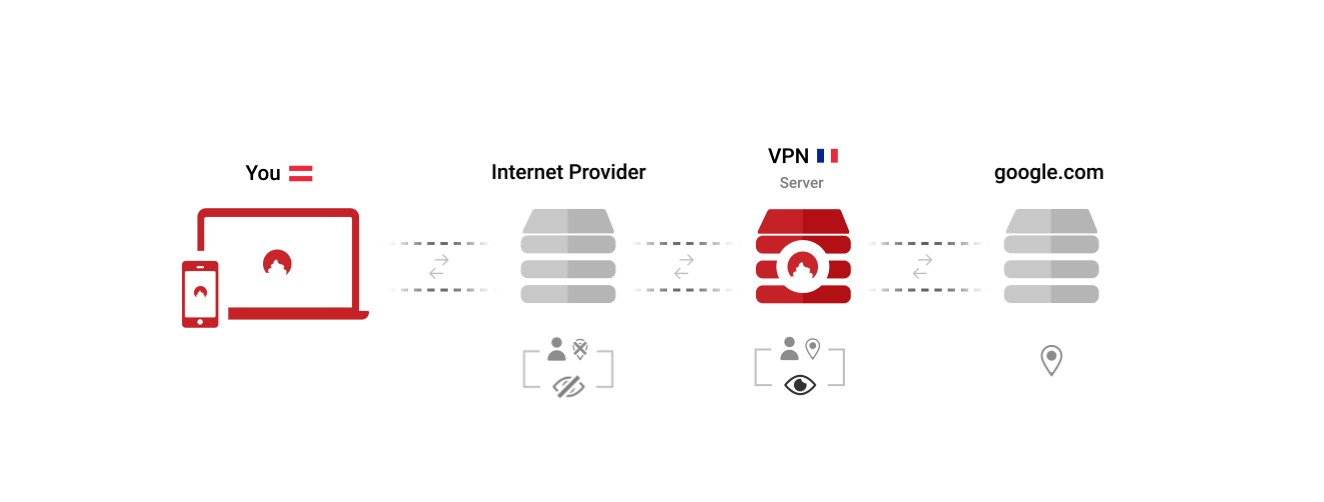
Open any VPN app, and you are presented with your most important choice: Choose the country you want to browse the Internet from. You exchange the identity of being a customer of your ISP with the identity of being a customer of your VPN provider. In this setup, you need to trust your VPN provider more than your ISP.
This is how this looks like:
SPN Gives You Multiple Identities, For Each App
When you first open the SPN, it will not ask you from which country you want to browse the Internet. Why limit yourself to one?
The SPN does not just use one server in one country, but uses many servers in many countries - all at the same time. This results in having many identities, not just one.
This is how this looks like:
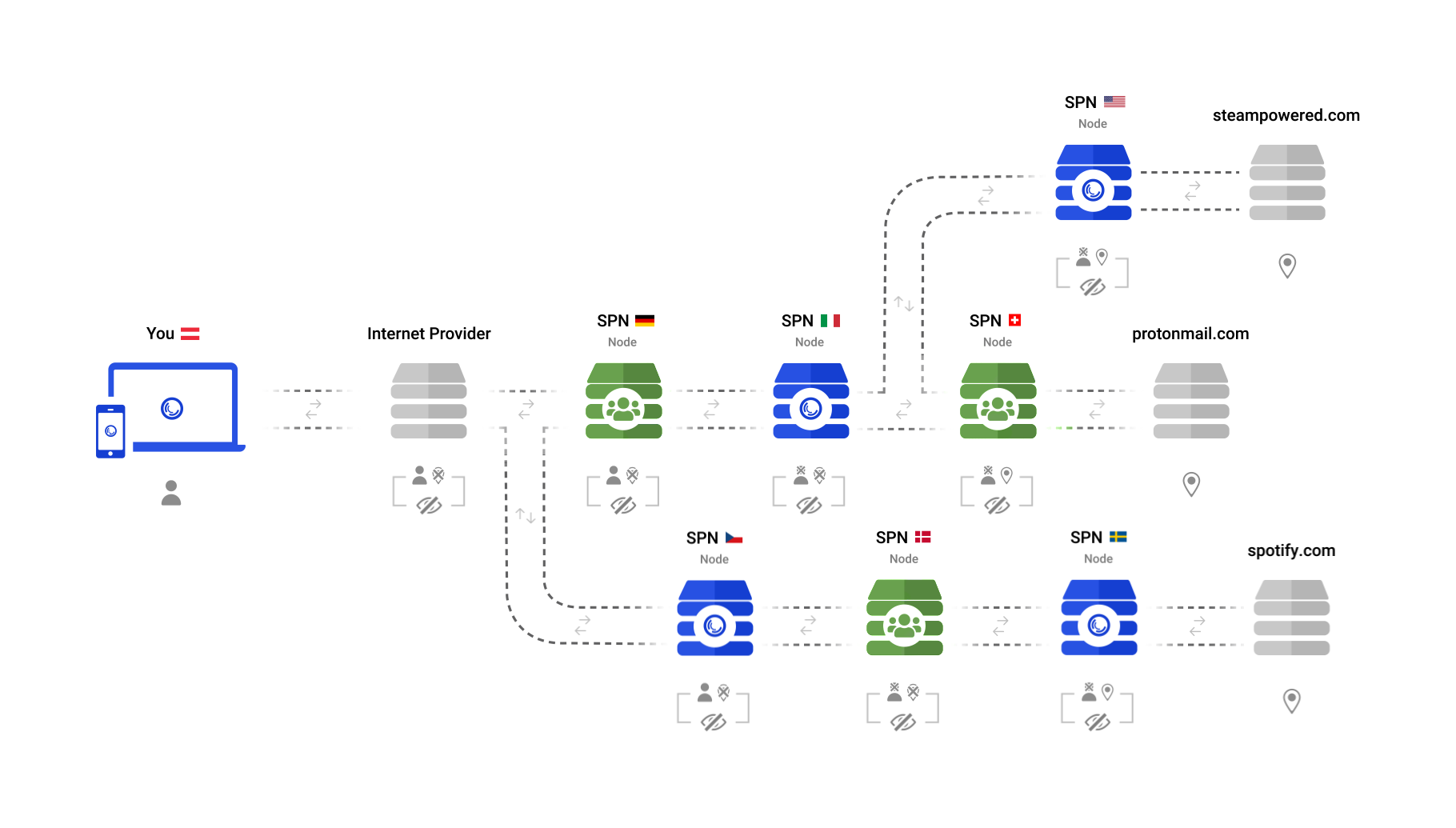
Instead of just “beaming” yourself to another place, you can now be everywhere at once. Connections are individually routed through the network, balancing privacy and performance.
Automatic Geo-Unblocking
The longer your connections stay within the SPN, the more private they are. This is why the SPN selects the final server (exit node) as close as possible to the destination server (eg: server of a website).
This also automatically unblocks geo-restricted content, as you will be accessing the content in the country it originates from.
In case you have special requirements, you can of course instruct the SPN to use a specific country for a website. Note: currently this feature is tricky to set up - it will improve in the future
VPNs cannot do this automatically, as they can only use one “exit” server at once, even if they are “multi-hop”.
You Can Easily Exclude Apps or Domains from SPN
While there are some VPNs that are able to exclude the local network (LAN) or certain apps from the VPN, the SPN takes this to a new level.
Similar to Portmaster firewall rules, you can very easily exclude any combination of domains or apps from being routed through the SPN. By default, it excludes local network resources, as well as any captive portal. You do not need to turn it off to log into the WiFi when traveling.
Both VPNs and SPN Are Easy to Setup
SPN is part of Portmaster, which seamlessly integrates into your system and has a straightforward installation process.
Most VPNs provide a custom app that is easy to install - some require you to manually configure a client, though.
SPN is Open Source
An auditable and open source code builds a high level of trust in the software. Instead of having to trust a privacy policy of the company, people can check the source code and see what it really does on a technical level.
The beauty with this is, the bigger the community around a software gets, the more secure it becomes, often outperforming proprietary software. Zero-day exploits and long-forgotten vulnerabilities become rarer since someone from the community usually discovers them.
The SPN is fully open source. Everyone can inspect the code and verify what it does. While some VPN providers open source their clients, most do not publish their server-side source code.
SPN and Privacy by Design
VPN technology was originally designed to connect corporate networks securely. VPN providers have adapted the technology for consumer privacy, with varying results. Features like kill switches and no-log policies address real risks within the VPN architecture.
SPN was designed from the start for consumer privacy on a per-connection basis. Because it is integrated into Portmaster’s network stack, it does not rely on external kill switches or default-route manipulation.
IP and DNS leaks are prevented by Portmaster, the underlying application that runs SPN, which controls all network connections on your device. All traffic goes through multiple servers and is encrypted in layers, so no server knows both who you are and where you are going.
Conclusion
Going back to the threat modeling we started with, users who need per-connection IP separation and onion routing across all applications may find SPN a better fit than a traditional VPN. Both tools address different threat models.
Part 2: Technical Deep-Dive Comparison
If you are curious, explore more technical details in the additional write-up below:
| SPN | Most VPNs | |
|---|---|---|
| Cryptographic Identity Protection | ||
| Community Nodes | ||
| No Network Logs | / | |
| No Kill Switch Needed | ||
| Full-Device Protection | ||
| Exclude Apps | / | |
| Exclude Domains |
Cryptographic Identity Protection
VPNs (Virtual Private Networks) are, well, networks that carry data packets through a tunnel from one point to the next. They are a more or less seamless part of the network. Packets destined for the Internet go into the VPN and out again without change. This means that packets are just relayed somewhere else and do not receive any advanced protection. Multi-Hop VPNs just relay your packets via one more server, but the problem remains: The packets do not receive any extra protection. Every server in that Multi-Hop chain can see all your traffic. Yes, the last server cannot see your IP address, but the previous servers can see all your traffic unencrypted and could potentially log your traffic. Additionally, if the VPN client authenticates with the last server in the chain, it may also have your VPN login data.
The SPN protects your traffic and identity with proper cryptography. Every packet is end-to-end encrypted to every single server along the chain of servers the connection uses. This was originally invented for Tor and is called Onion Routing. This way, every server in the chain only knows the previous and the next hop. No server knows who you are and where you are going to.
But the SPN goes even one step further. Instead of using your username and password - which makes you identifiable - to log into the SPN, Portmaster authenticates itself not against the network itself, but against the SPN Account Service, which verifies you are allowed to access the network. It then gives you special cryptographically blinded tokens, which prove your access permission, but are not linked to your account anymore.
This way, no server in the SPN will know your username.
Node Ownership and Logging
As VPNs are centralized, all their servers are operated by one entity. Because traffic passes through their servers, logging policies are an important trust factor when evaluating a VPN provider.
SPN invites the community to join the network and strengthen it by adding diversity to the operators of the network. In addition to the cryptographic protections, this makes it very difficult for anyone to track you through the SPN. Because of the cryptographic identity protection mentioned before, there are no logs with identifiable data to begin with.
SPN Does Not Need A Kill Switch
VPNs came up with the idea of kill switches, because they need to change the “default route”, which is more or less what tells your device where to send all its traffic to. If you install a VPN, it will add a “virtual network” to your device and will update the default route to point to that network. If your device sends network packets to that virtual network, they will be encrypted and sent to your VPN provider, who will then release these packets to the Internet to do their thing. So far so good.
But when the connection to your VPN provider breaks - for whatever reason - your operating system will disable the virtual network and automatically change the default route to point to your ISP. This happens in a blink of an eye - your VPN software will not even notice.
SPN easily solves this since it is part of Portmaster, which tightly controls all the network connections of your device. It always knows what is going on and stops any leaks in its tracks.
Private Account and Payments
For a truly private experience, it is not only important to protect connections, but also your identity when signing up and making a payment.
Payment options vary across VPN providers.
When you sign up for the SPN, you can just go with the pre-filled random generated username and choose a password. You need to fill out a country with a matching phone prefix for tax and legal reasons - just to make everything legal and well on our side. While we cannot verify what you fill in these fields - we do not look at your IP address - we trust that our users are well-meaning and trustworthy.
Payments can be done using Bitcoin and Monero, or by sending cash (Euros). If you do not need to protect your privacy in that regard, we offer credit card payments and PayPal for your convenience.
Conclusion
SPN and VPNs both conceal your IP address by routing traffic through servers. SPN goes further: each connection travels a separate path through the network with layered encryption, providing a different IP per connection across all applications. Users whose threat model requires this level of per-connection isolation may find SPN better suited to their needs.
September 6, 2022 • Written by Daniel
Updated: April 22, 2026 • Updated by Viktor